How to Give a Presentation Without Using PowerPoint is a refreshing approach in today’s presentation landscape. Forget static slides! This guide explores how to captivate audiences by embracing storytelling, interactive elements, and impactful visual aids. We’ll delve into the shift away from the traditional slideshow and uncover the power of engaging techniques that leave a lasting impression.
From mastering the art of storytelling and harnessing the power of body language to utilizing physical props and refining your delivery, this guide offers a comprehensive toolkit. Learn to structure your presentation without slides, engage your audience through active participation, and adapt your approach to different environments. Prepare to transform your presentations into memorable experiences.
Understanding the PowerPoint-Free Presentation Landscape

In today’s dynamic professional environment, the way we communicate is constantly evolving. While PowerPoint has long been the standard for presentations, a shift is occurring. Many presenters are now exploring alternative methods to engage audiences and deliver impactful messages. This section delves into the reasons behind this shift and the advantages of presentations that move beyond the constraints of slides.
The Shift Away from PowerPoint
The reliance on PowerPoint is diminishing due to several factors, including the desire for more authentic engagement, the limitations of static visuals, and the potential for presentations to become overly formulaic. The goal is often to connect with the audience on a deeper level and deliver a more memorable experience.
Industries and Situations Where PowerPoint is Less Effective
Certain industries and presentation scenarios benefit more from PowerPoint alternatives. Consider these examples:
- Creative Industries: In fields like design, advertising, and film, presentations often involve showcasing visual portfolios, storyboards, or mood boards. These are frequently more effectively presented through interactive demonstrations, physical mockups, or short video clips, allowing for a more fluid and immersive experience.
- Training and Workshops: Hands-on training sessions and workshops often prioritize interaction and practical application. PowerPoint can be used, but the focus should be on exercises, group discussions, and real-time demonstrations rather than a slide-by-slide lecture. The goal is to facilitate learning and skill development, which is often achieved more effectively through direct engagement.
- Informal Settings: For team meetings, brainstorming sessions, or one-on-one discussions, a formal PowerPoint presentation can feel out of place. A whiteboard, a flip chart, or simply a well-structured conversation often serves the purpose of sharing information and collaborating more effectively.
- Sales Pitches (Sometimes): While PowerPoint can be used in sales, it can sometimes feel detached. Some sales professionals find that using a conversational approach, focusing on the client’s needs and providing tangible examples, is more effective than presenting a series of slides.
Advantages of Alternative Presentation Methods
PowerPoint alternatives offer several key benefits that can enhance audience engagement and message retention. These methods can improve the overall presentation experience:
- Increased Audience Engagement: Without the crutch of slides, presenters are forced to be more present and interactive. This can lead to a more dynamic exchange and a deeper connection with the audience. Instead of reading off slides, the presenter can tell a story, use humor, and respond to audience cues.
- Enhanced Memorability: Presentations that are more engaging and memorable are more likely to leave a lasting impact. This is achieved through storytelling, interactive elements, and the use of visual aids that are not static. The absence of slides can allow the audience to focus on the speaker and the message, not the bullet points.
- Greater Flexibility: Alternative presentation methods allow for greater flexibility. The presenter can adapt the content to the audience’s reactions and the flow of the conversation. This contrasts with the rigidity of a slide-based presentation.
- Improved Authenticity: Presentations that are less polished and more conversational can feel more authentic. This can build trust and rapport with the audience, making them more receptive to the message. The focus shifts from information delivery to genuine communication.
- Reduced Cognitive Load: The reliance on text-heavy slides can overwhelm the audience. Alternative methods often involve simpler visuals, or no visuals at all, which can reduce the cognitive load and allow the audience to focus on the key message.
Mastering the Art of Storytelling
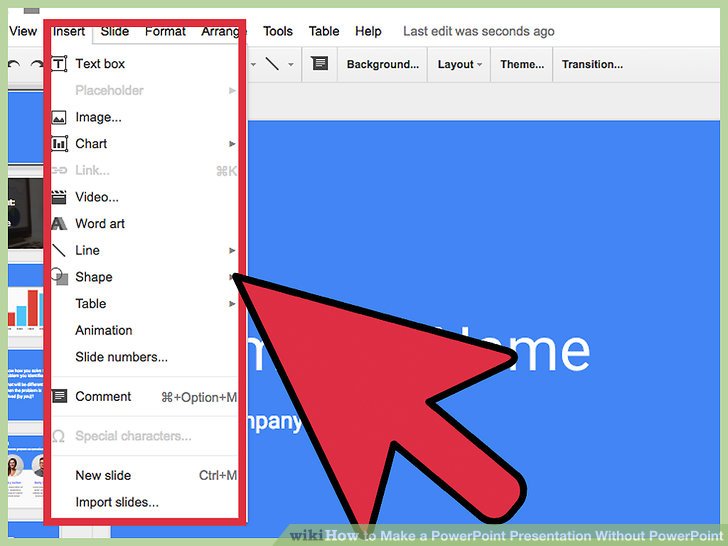
Storytelling is the heart of any engaging presentation, especially when PowerPoint isn’t an option. It transforms information into an experience, captivating your audience and making your message memorable. A well-crafted narrative allows you to connect with your listeners on an emotional level, fostering understanding and encouraging action. By focusing on a compelling story, you can hold your audience’s attention and ensure your key points resonate long after the presentation is over.
Structuring a Compelling Narrative
The foundation of a great presentation lies in its structure. Think of your presentation as a journey, and your audience as travelers. A clear structure provides the map, guiding them from the starting point to the destination. A well-defined narrative structure makes your presentation easier to follow, more persuasive, and ultimately, more impactful.The most common narrative structure for presentations is a modified version of the classic story arc:
- Exposition: Introduce the setting, characters (you and your audience), and the initial situation or problem. This is where you grab their attention. Start with a hook—a surprising statistic, a compelling question, or a brief anecdote. For example, “Did you know that the average person forgets 70% of what they learn within 24 hours?”
- Rising Action: Build tension and introduce the central conflict or challenge. Provide background information, evidence, and supporting details. This is the meat of your presentation, where you present your core arguments and data. Use clear and concise language, avoiding jargon that might alienate your audience.
- Climax: The turning point of your presentation. This is where you present your solution, your key takeaway, or the most crucial piece of information. It’s the moment of highest intensity, the peak of the narrative. It should be memorable and impactful.
- Falling Action: Address any remaining questions, provide supporting evidence, and explain the implications of your solution. Show how your ideas work in practice. Consider real-world examples to reinforce your points.
- Resolution: The conclusion, where you summarize your main points, offer a call to action, and leave your audience with a lasting impression. Remind them of the benefits of your message and what they should do next. End on a strong note.
This structure isn’t rigid; you can adapt it to fit your specific topic and audience. The key is to ensure a clear and logical flow, guiding your audience through the information and leaving them with a clear understanding of your message.
Common Storytelling Techniques for Presentations
Incorporating storytelling techniques can significantly enhance your presentation’s impact. These techniques add depth, emotion, and memorability to your message, making it more engaging and persuasive.Here are some common storytelling techniques applicable to presentations:
- The Hero’s Journey: A classic narrative arc where a protagonist faces challenges, overcomes obstacles, and emerges transformed. You can frame your presentation around a “hero” (your audience or a client) and the challenges they face, positioning your solution as the key to their success.
- Problem/Solution: Clearly define a problem, then present your solution. This is a straightforward and effective approach, especially for presentations focused on offering products or services.
- Before/After: Illustrate the “before” state (the problem) and the “after” state (the solution). This is a powerful technique for visualizing the impact of your message.
- The Spark: This technique involves identifying a pivotal moment or “spark” that led to a change or breakthrough. It can be used to introduce a new idea or concept, highlighting the origin and evolution of an idea.
- Anecdotes: Short, personal stories that humanize your message and connect with the audience on an emotional level. We’ll discuss these in detail below.
- Metaphors and Analogies: Use comparisons to explain complex concepts in a relatable way. For example, comparing a company’s growth to a plant growing from a seed, illustrating its journey from the beginning to its current state.
- Suspense: Create anticipation by withholding information or hinting at a surprising revelation. This can be used to keep the audience engaged and curious.
By carefully selecting and integrating these techniques, you can transform your presentation from a simple information dump into a captivating narrative that resonates with your audience.
Using Personal Anecdotes to Connect with the Audience
Personal anecdotes are powerful tools for connecting with your audience on a deeper level. Sharing personal experiences humanizes you, making you more relatable and trustworthy. This connection fosters empathy and allows your audience to see the relevance of your message to their own lives.Here’s how to effectively use personal anecdotes:
- Choose Relevant Stories: Select anecdotes that directly relate to your topic and your audience’s interests. The story should illustrate a key point or support your overall message.
- Keep it Concise: Anecdotes should be brief and to the point. Avoid rambling or including unnecessary details.
- Focus on Emotion: Share your feelings and the emotions you experienced during the event. This allows your audience to connect with you on an emotional level.
- Use Sensory Details: Describe the scene using vivid language that appeals to the senses (sight, sound, smell, taste, touch). This helps the audience visualize the story and immerse themselves in the experience.
- Highlight the Lesson Learned: Clearly state the takeaway or the lesson you learned from the anecdote. This reinforces the connection between the story and your overall message.
For example, if you’re presenting about overcoming challenges in business, you might share a story about a time your company faced a significant setback. Describe the challenges you encountered, the emotions you felt, and the strategies you used to overcome them. The lesson learned might be about the importance of resilience, adaptability, and teamwork.Another example: imagine a presentation on the benefits of using a new project management software.
Instead of simply listing features, you could share a personal anecdote about how the software helped you streamline your own work, reduce stress, and improve your team’s efficiency. You could describe a specific project where you were struggling with traditional methods.By using personal anecdotes, you can create a more engaging and memorable presentation that resonates with your audience and leaves a lasting impression.
Engaging Your Audience with Active Participation
Presentations without PowerPoint can be incredibly engaging, but it requires a shift from passive viewing to active participation. Instead of relying on static slides, the focus should be on creating a dynamic experience that involves the audience. This involves thoughtfully designing interactive elements and encouraging audience contribution throughout the presentation.
Designing Interactive Elements to Replace Static Slides
Replacing static slides necessitates a creative approach to information delivery. The goal is to transform what might have been presented visually into engaging activities and discussions. Consider these interactive elements:
- Brainstorming Sessions: Facilitate collaborative brainstorming. Ask the audience to generate ideas related to the topic. For example, if the presentation is about problem-solving, ask them to brainstorm solutions to a specific challenge. This can be done verbally, on a whiteboard, or using a shared digital document.
- Live Polls and Quizzes: Use tools like Mentimeter or Slido to conduct live polls or quizzes. These tools allow you to pose questions and display the audience’s responses in real-time. This provides immediate feedback and keeps the audience alert.
- Case Studies and Role-Playing: Present a case study and ask the audience to analyze it, discussing the key issues and potential solutions. Role-playing scenarios can also be effective, allowing audience members to take on different roles and interact with each other.
- Interactive Demonstrations: If applicable, demonstrate a process or concept live. This could involve building something, solving a problem, or showcasing a product. This hands-on approach is far more engaging than simply showing a static slide.
- Physical Activities: Incorporate physical activities. For example, use a “gallery walk” where the audience moves around the room to view and comment on different ideas or concepts posted on flip charts. This combats the passivity often associated with presentations.
Identifying Methods to Encourage Audience Participation and Discussion
Encouraging audience participation requires deliberate strategies to foster a sense of inclusivity and encourage active involvement. Effective methods include:
- Open-Ended Questions: Frame questions that encourage more than just a yes or no answer. For example, instead of asking “Do you agree?”, ask “What are your thoughts on this?”. This prompts more detailed responses and discussion.
- Small Group Discussions: Break the audience into smaller groups to discuss specific topics or questions. This can be particularly effective in larger audiences, as it gives more people a chance to speak. Provide clear instructions and a time limit for each discussion.
- Structured Discussions: Implement a structured discussion format, such as the “fishbowl” technique. This involves a small group of people discussing a topic in the center of the room, while the rest of the audience observes. The observers can then ask questions or join the discussion.
- Using Visual Aids for Participation: Utilize visual aids like whiteboards, flip charts, or large sheets of paper to capture audience input. This can be used for brainstorming, mapping ideas, or recording key takeaways.
- Recognizing and Acknowledging Contributions: Actively acknowledge and appreciate audience contributions. Use phrases like “That’s a great point,” or “Thank you for sharing that perspective.” This validates their input and encourages further participation.
Elaborating on the Benefits of Q&A Sessions and Audience Feedback
Q&A sessions and audience feedback are critical components of a successful PowerPoint-free presentation. They offer significant benefits:
- Clarifying Understanding: Q&A sessions allow the presenter to clarify any points that may not have been fully understood during the presentation. This ensures that the audience leaves with a clear understanding of the key concepts.
- Addressing Specific Concerns: Audience members can raise specific questions or concerns that are relevant to their own experiences or interests. This personalized interaction makes the presentation more relevant and impactful.
- Gathering Valuable Feedback: Audience feedback provides valuable insights into the effectiveness of the presentation. It helps the presenter identify areas of strength and areas that need improvement.
- Fostering a Sense of Connection: Q&A sessions and feedback sessions create a more personal connection between the presenter and the audience. This fosters trust and rapport, making the presentation more memorable.
- Demonstrating Expertise: Handling Q&A effectively demonstrates the presenter’s expertise and ability to think on their feet. This builds credibility and reinforces the presenter’s authority on the topic.
The Power of Visual Aids (Beyond PowerPoint)
Visual aids are crucial for any presentation, even when PowerPoint is off the table. They enhance understanding, maintain audience engagement, and help to make your message more memorable. The key is to choose the right visual aid for your content and presentation style. This section explores alternative visual aids to PowerPoint, offering practical guidance on their effective use.
Comparing Visual Aid Options
Different visual aids have unique strengths and weaknesses. Understanding these differences allows you to select the most appropriate tools for your presentation. The following table provides a comparative analysis of whiteboards, flip charts, and props.
| Visual Aid | Pros | Cons | Best Uses |
|---|---|---|---|
| Whiteboard |
|
|
|
| Flip Chart |
|
|
|
| Props |
|
|
|
Creating Effective and Memorable Visuals
Crafting impactful visuals requires thoughtful planning and execution. Consider these tips to maximize the effectiveness of your visual aids.
- Keep it Simple: Avoid overcrowding your visuals with too much text or complex diagrams. Use clear, concise language and focus on the essential information. A cluttered visual can confuse and disengage your audience. The principle of simplicity applies to all visual aids, from whiteboards to props.
- Use Color Strategically: Color can enhance your visuals, but use it purposefully. Employ color to highlight key points, differentiate elements, and create visual interest. Avoid using too many colors, which can be distracting. Consider using a color palette that aligns with your brand or the topic of your presentation.
- Incorporate Visual Hierarchy: Guide your audience’s eye by establishing a clear visual hierarchy. Use size, placement, and contrast to emphasize the most important information. For example, place the main point at the top of a flip chart page or use a larger font size for key headings.
- Practice and Prepare: Before your presentation, practice using your visual aids. Ensure you are comfortable with the setup and that the visuals are easily visible from all parts of the room. Practice helps you avoid fumbling during your presentation and allows you to focus on your message.
- Choose Relevant Props: If using props, ensure they are relevant to your topic and enhance your message. A prop should serve a purpose beyond mere decoration. For example, if you are presenting on the evolution of a product, bring the product itself and its previous versions to demonstrate the changes.
Utilizing Physical Props and Demonstrations
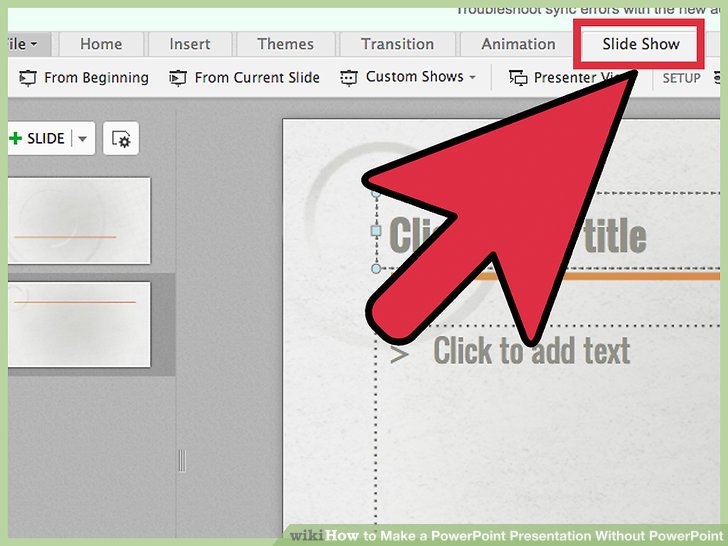
Incorporating physical props and demonstrations into your presentation can transform it from a passive lecture into an engaging and memorable experience. This method provides a tangible connection to your audience, making complex concepts easier to grasp and increasing audience retention. By strategically using props, you can illustrate points more effectively than words alone, adding a layer of visual and tactile stimulation that captivates and sustains interest.
Selecting Props for Effective Presentation
Choosing the right props is crucial for a successful presentation. The selection process should be guided by your presentation’s objectives and the nature of your subject matter.
- Relevance: Props must directly relate to your presentation’s core message. Avoid using items that are distracting or irrelevant, as they can confuse the audience and dilute your point.
- Clarity: Select props that are easily understood and visually clear. Complex or overly intricate props can be difficult for the audience to interpret quickly. Choose items that can be easily seen and understood from a distance.
- Functionality: Ensure the props are functional and can be used effectively during your presentation. They should serve a purpose, whether it’s to demonstrate a process, illustrate a concept, or provide a visual aid.
- Size and Visibility: The size of the prop should be appropriate for the venue and the size of your audience. It should be large enough for everyone to see clearly, without being cumbersome or difficult to handle. Consider using a larger-than-life model or a projection if necessary.
- Safety and Logistics: Always prioritize safety. Ensure the props are safe to handle and use, and that you have the necessary space and equipment to use them. Plan for transport, setup, and storage.
Successful Presentations Utilizing Physical Demonstrations
Several presentations have successfully utilized physical demonstrations to convey complex information and captivate audiences. These examples illustrate the power of tangible experiences.
- Apple Product Launches: Steve Jobs frequently used product demonstrations to unveil new Apple products. During the launch of the original iPhone, he demonstrated its touch screen capabilities, showcasing the device’s intuitive interface. The physical demonstration allowed the audience to experience the product firsthand, making the innovation clear and memorable.
- Cooking Demonstrations: Cooking shows on television and live demonstrations at culinary events regularly use physical demonstrations. Chefs prepare dishes in real-time, showing techniques, ingredients, and the transformation of raw materials into finished products. This hands-on approach allows the audience to learn and appreciate the culinary process.
- Science Experiments: Science educators often employ physical demonstrations to illustrate scientific principles. For instance, demonstrating the effects of air pressure by crushing a can, or showing the chemical reaction between baking soda and vinegar to produce carbon dioxide. These demonstrations help to make abstract concepts concrete and memorable.
Safety Precautions When Using Props
Using props adds a dynamic element to presentations, but it is crucial to prioritize safety. Careful planning and execution are necessary to avoid accidents.
- Risk Assessment: Before using any prop, conduct a thorough risk assessment. Identify potential hazards, such as sharp edges, electrical components, or flammable materials. Evaluate the likelihood and severity of potential harm.
- Safe Handling: Provide clear instructions on how to handle the props safely. Avoid props that could cause injury, such as sharp objects or heavy items that could fall.
- Supervision: If using props that involve interaction with the audience, such as during a demonstration, provide adequate supervision. This is particularly important when children or untrained individuals are involved.
- Protective Equipment: If the props or demonstrations involve any potential risk, ensure that the necessary protective equipment is available and used. This might include safety glasses, gloves, or other appropriate gear.
- Venue Safety: Ensure the venue is suitable for the demonstration. Check for adequate space, proper ventilation, and compliance with safety regulations. Consider fire safety regulations and emergency exits.
- Practice: Practice the demonstration thoroughly before the presentation. This will help to identify and address any potential issues or hazards.
- Emergency Plan: Have an emergency plan in place. Know how to respond to accidents or unexpected events. This includes having first aid supplies readily available and knowing the location of emergency exits.
Practicing and Refining Your Delivery
Rehearsing and refining your presentation delivery is crucial for success, transforming a good presentation into a memorable one. Thorough preparation not only boosts your confidence but also allows you to fine-tune your message, anticipate potential challenges, and connect with your audience on a deeper level. This section delves into the essential aspects of practice, providing techniques to manage nervousness and offering a self-assessment checklist to elevate your presentation skills.
Importance of Rehearsal and Preparation
Effective rehearsal is more than just reading through your notes; it’s a dynamic process of refining your presentation. It allows you to identify areas for improvement, solidify your content, and become comfortable with the flow of your speech. Practicing also helps you manage your time effectively and ensure you cover all your key points within the allotted timeframe.Rehearsal should involve simulating the actual presentation environment as closely as possible.
This includes:
- Timing: Practice your presentation from start to finish, paying close attention to how long each section takes. Adjust your content as needed to fit within the allocated time.
- Content Mastery: Focus on delivering your content naturally, rather than reading directly from your notes. This demonstrates confidence and allows for better audience engagement.
- Visual Aid Integration: If using visual aids (such as props or flip charts), practice incorporating them seamlessly into your presentation.
- Feedback Collection: Rehearse in front of friends, colleagues, or family members and ask for constructive feedback. This can help you identify areas where you can improve clarity, engagement, or delivery.
Techniques for Controlling Nervousness and Stage Fright
Nervousness is a common experience for presenters, but it can be managed effectively with the right techniques. These strategies focus on physical, mental, and behavioral approaches to help you stay calm and focused.
- Deep Breathing Exercises: Before your presentation, take slow, deep breaths. Inhale deeply through your nose, hold for a few seconds, and exhale slowly through your mouth. This helps to calm your nervous system and reduce physical symptoms of anxiety, such as a racing heart.
- Visualization: Imagine yourself delivering a successful presentation. Visualize the audience responding positively, and feel confident and in control. Positive visualization can boost your self-assurance and reduce pre-presentation jitters.
- Physical Preparation: Ensure you are well-rested and hydrated. Get some light exercise to release tension and boost your mood.
- Preparation and Practice: The more you rehearse, the more comfortable you will become with your material, reducing the fear of the unknown.
- Focus on Your Message: Shift your focus from your nervousness to the value you are providing to your audience. Concentrate on delivering your message effectively and helping your audience.
- Embrace Imperfection: Accept that it’s okay to make mistakes. No one expects perfection. If you stumble, recover gracefully and move on.
Self-Assessment Checklist After Each Practice Session
Regular self-assessment is critical to improving your presentation skills. Use this checklist after each practice session to identify areas for improvement and track your progress.
- Content Clarity: Was your message clear and easy to understand? Did you avoid jargon and explain complex concepts effectively?
- Delivery: Did you speak at a comfortable pace? Did you maintain good eye contact? Did you vary your tone and pace to keep the audience engaged?
- Engagement: Did you effectively engage the audience? Did you use any interactive elements? Did you maintain a good connection with your audience?
- Time Management: Did you stay within your allotted time? Did you cover all your key points?
- Visual Aids (if applicable): Were your visual aids effective? Did they enhance your message?
- Confidence and Presence: Did you appear confident and comfortable? Did you project a positive and enthusiastic attitude?
- Areas for Improvement: What specific areas need further work? Note any stumbles, areas of confusion, or points where you felt uncomfortable.
- Overall Impression: How did you feel about the presentation? What was the overall impact of your presentation?
Body Language and Nonverbal Communication
Body language is a silent language, a powerful form of communication that can either amplify or undermine your spoken words. It’s the nonverbal cues you send through your posture, gestures, facial expressions, and eye contact. Mastering body language is crucial for delivering a compelling presentation, as it significantly influences how your audience perceives your message and, ultimately, how effectively they receive it.
The Role of Body Language in Conveying Your Message
Body language plays a vital role in reinforcing your message and establishing a connection with your audience. It helps to convey your confidence, enthusiasm, and credibility. When your nonverbal cues align with your spoken words, your audience is more likely to trust and believe what you are saying. Conversely, incongruent body language can create doubt and distraction, leading to a loss of engagement.
For instance, a presenter who states “I’m excited about this project” while looking down and fidgeting is likely to be perceived as insincere.
Common Body Language Mistakes to Avoid
Several common body language mistakes can detract from your presentation. Being aware of these pitfalls allows you to make conscious efforts to improve your nonverbal communication. Avoiding these mistakes can significantly enhance your presentation’s impact.
- Lack of Eye Contact: Avoiding eye contact can make you appear untrustworthy, nervous, or disinterested. Staring blankly at a single point or at the ceiling diminishes your ability to connect with the audience.
- Fidgeting: Playing with your hands, tapping your foot, or shifting your weight constantly can be distracting and signal nervousness or a lack of preparation. These movements can pull the audience’s focus away from your message.
- Closed-Off Posture: Crossing your arms, hunching your shoulders, or turning your body away from the audience creates a barrier and can signal defensiveness or disinterest. This posture makes it harder to establish rapport.
- Poor Facial Expressions: A blank or unchanging expression can make you appear detached or uninterested. Failing to smile or show appropriate emotion can make it difficult for the audience to connect with your message.
- Reading Directly from Notes: While using notes is acceptable, relying on them too heavily can lead to a loss of eye contact and a monotone delivery, reducing engagement.
Effective Body Language Techniques
Employing effective body language techniques enhances your presentation’s impact and fosters a strong connection with your audience. These techniques are applicable in various presentation scenarios.
| Technique | Description | Benefits | Example |
|---|---|---|---|
| Maintain Eye Contact | Make regular eye contact with different members of the audience. Avoid staring at one person for too long. | Builds trust, shows engagement, and helps to gauge audience reaction. | Imagine you are speaking with a friend; look at different people for a few seconds each, moving around the room. |
| Use Open Posture | Stand tall, uncross your arms, and face the audience directly. Use open hand gestures. | Projects confidence, approachability, and openness to ideas. | During a presentation on problem-solving, open your hands when you say, “Let’s explore the solutions we have.” |
| Incorporate Gestures | Use natural and purposeful hand gestures to emphasize points and add visual interest. Avoid excessive or distracting movements. | Enhances understanding, keeps the audience engaged, and makes the presentation more dynamic. | When discussing a trend, use your hands to illustrate the upward trajectory. |
| Vary Facial Expressions | Use your facial expressions to match the tone and content of your message. Smile when appropriate and show genuine emotion. | Connects with the audience emotionally and makes the presentation more relatable. | When sharing a success story, smile and show enthusiasm; when discussing a challenge, show a concerned but determined expression. |
Structuring Your Presentation Without Slides
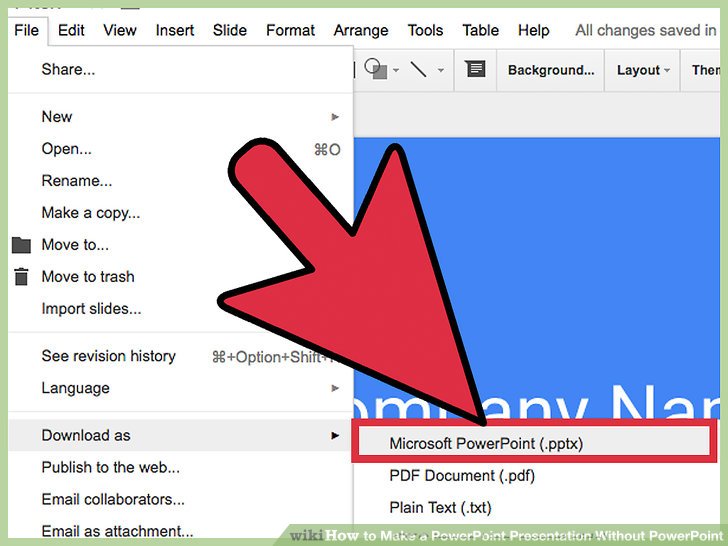
Organizing your presentation without PowerPoint requires a different approach to content flow and structure. The goal is to create a cohesive and engaging narrative that keeps your audience captivated. This section will guide you through frameworks, planning tools, and a step-by-step procedure for crafting a compelling, slide-free presentation.
Frameworks for Content Organization
Developing a robust framework is essential for organizing your presentation effectively. A well-structured presentation provides a clear roadmap for both you and your audience. Several proven frameworks can be adapted to a slide-free environment.
- The Problem-Solution-Benefit Framework: This is a classic framework that works exceptionally well.
- Problem: Clearly identify the problem you are addressing. Provide context and emphasize its significance.
- Solution: Present your solution, outlining its key features and how it addresses the problem.
- Benefit: Highlight the benefits of your solution, emphasizing the positive outcomes for the audience.
- The Situation-Complication-Resolution Framework: Ideal for presentations dealing with challenges or changes.
- Situation: Describe the current situation or context.
- Complication: Introduce the complication or challenge that arises.
- Resolution: Present your proposed resolution, outlining how it addresses the complication.
- The Chronological Framework: Useful for presentations that tell a story or Artikel a process.
- Beginning: Start with the initial stage or event.
- Middle: Detail the events that occur in the middle, highlighting key milestones or challenges.
- End: Conclude with the final stage or outcome.
Utilizing Visual Aids for Planning
Even without slides, visual aids play a crucial role in planning and organizing your presentation. Mind maps and other visual tools can help you visualize your ideas and create a logical flow.
- Mind Maps: Mind maps are excellent for brainstorming and organizing information. Start with your central topic in the center and branch out with related ideas, s, and supporting details. Use colors and s to enhance clarity and recall. This allows you to visualize the relationships between different elements of your presentation.
Imagine a mind map centered on the topic “Effective Communication.” Branches might include: “Verbal Communication,” “Nonverbal Communication,” “Active Listening,” and “Written Communication.” Each of these branches would further expand with sub-branches and s, such as “Verbal Communication” leading to “Clarity,” “Tone,” and “Pace.”
- Artikel: A detailed Artikel serves as a linear structure. Begin by listing the main topics and then breaking them down into s and supporting details. This approach provides a clear sequence for your presentation.
- Storyboards: Storyboards are helpful when you’re incorporating demonstrations or physical props. Sketch out the key moments of your presentation, noting what you will be doing, saying, and showing at each stage. This helps ensure a smooth flow and effective use of your visual aids.
Step-by-Step Procedure for Creating a Slide-Free Presentation
Creating a presentation without slides requires a methodical approach to ensure it is engaging and informative. This step-by-step procedure will guide you through the process.
- Define Your Objective: Clearly state what you want your audience to know, feel, or do after your presentation. This is the foundation for everything else.
- Identify Your Audience: Understand your audience’s background, knowledge, and interests. Tailor your content and language to resonate with them.
- Choose a Framework: Select a framework (e.g., Problem-Solution-Benefit, Situation-Complication-Resolution, Chronological) that best suits your topic and objective.
- Brainstorm and Artikel: Use mind maps or a detailed Artikel to brainstorm ideas, organize your content, and establish a logical flow.
- Develop Your Story: Craft a compelling narrative. Focus on storytelling techniques to keep your audience engaged. Use anecdotes, examples, and real-world data to illustrate your points.
- Prepare Visual Aids: Decide on the visual aids you will use (e.g., props, demonstrations, flip charts). Plan how and when you will incorporate them. Ensure they are relevant and enhance your message.
- Practice Your Delivery: Rehearse your presentation multiple times. Pay attention to your pacing, body language, and voice modulation. Record yourself to identify areas for improvement.
- Refine and Revise: Based on your practice sessions, refine your content and delivery. Adjust your visual aids and ensure a smooth transition between different sections.
- Prepare for Questions: Anticipate questions your audience might ask and prepare concise and informative answers.
- Deliver with Confidence: On the day of your presentation, be confident and enthusiastic. Engage with your audience, maintain eye contact, and use your visual aids effectively.
The Power of Voice and Tone
Using your voice effectively is crucial in a PowerPoint-free presentation. Your voice is your primary tool for conveying information, building rapport, and keeping your audience engaged. It’s more than just speaking clearly; it’s about using vocal techniques to add depth, emotion, and impact to your message. A well-modulated voice can transform a mundane presentation into a captivating experience.
Captivating Your Audience with Vocal Techniques
Your voice is a powerful instrument capable of conveying a wide range of emotions and nuances. Mastering vocal techniques can significantly enhance your presentation skills and hold your audience’s attention.For example, varying your pace is essential. Slowing down can emphasize key points, allowing your audience to absorb information. Conversely, speeding up can create a sense of urgency or excitement. Pauses are equally important.
A well-timed pause before or after a significant statement creates anticipation and allows the information to resonate.Another key element is pitch. Raising your pitch can indicate excitement or enthusiasm, while lowering it can suggest seriousness or authority. Volume also plays a critical role. Speaking louder can grab attention, while speaking softly can create intimacy or emphasize a point’s importance.Consider the impact of using these techniques:
“Imagine you are presenting the concept of a new environmentally friendly technology. To emphasize its significance, you could start with a lower, steady tone, describing the current environmental challenges. Then, when introducing the technology’s benefits, gradually increase your pitch and pace, conveying your enthusiasm. Pausing before the technology’s name allows the audience to anticipate its arrival.”
These vocal techniques, when applied thoughtfully, transform your presentation into a dynamic and engaging experience.
Examples of Vocal Techniques for Emphasis and Engagement
Different vocal techniques serve specific purposes in a presentation. Here are some examples:
- Emphasis through Volume: Speaking louder to highlight a critical piece of information.
- Emphasis through Pace: Slowing down to allow the audience to absorb complex details or speeding up to build excitement.
- Emphasis through Pitch: Raising your voice to express enthusiasm or lowering it to convey authority.
- Emphasis through Pauses: Using strategic pauses before or after key statements to create anticipation and emphasize importance.
- Inflection: Varying your tone to add emotion and interest to your speech.
- Modulation: Changing your voice’s volume and pitch to keep the audience engaged.
For instance, consider a presentation on the benefits of exercise. You might use a louder volume and faster pace to describe the initial excitement of starting a new fitness routine. Then, you might slow down and lower your pitch to discuss the long-term health benefits, allowing the audience to fully understand the importance of consistency.
Vocal Exercises to Improve Presentation Delivery
Regular vocal exercises can significantly improve your vocal control, projection, and overall presentation delivery. Here are some exercises you can practice:
- Diaphragmatic Breathing: Practice breathing deeply from your diaphragm. Place one hand on your stomach and the other on your chest. Your stomach should rise as you inhale, while your chest remains relatively still. This exercise supports vocal projection.
- Lip Trills: Gently blow air through your lips to create a vibrating sound, like a motorboat. This warms up your vocal cords and improves breath control.
- Tongue Twisters: Practice tongue twisters to improve articulation and clarity. Examples include “She sells seashells by the seashore” and “Peter Piper picked a peck of pickled peppers.”
- Vocal Range Exercises: Practice singing scales, gradually increasing and decreasing your pitch. This helps expand your vocal range and control.
- Resonance Exercises: Experiment with different parts of your mouth to feel the vibrations of your voice. Try humming and feeling the vibrations in your chest, nose, and head.
- Record and Review: Record yourself speaking and listen back to identify areas for improvement in your voice, pace, and clarity.
Regularly practicing these exercises can significantly improve your voice projection, articulation, and overall presentation delivery. This, in turn, will boost your confidence and keep your audience more engaged.
Adapting to Different Presentation Environments
Presenting without PowerPoint demands adaptability. The ideal approach for a small, informal meeting differs drastically from a large conference keynote. Understanding how to tailor your presentation to the specific environment is crucial for maximizing audience engagement and delivering a memorable experience. This section explores strategies for adapting your presentation style, content, and delivery to various settings, ensuring your message resonates regardless of the venue.
Adjusting Your Approach Based on Presentation Size and Setting
The size and setting of your presentation heavily influence your preparation and delivery. Consider the audience size, the formality of the event, and the available resources. A smaller group allows for greater interaction and personalization, while a larger audience necessitates broader generalizations and a more structured approach.For small group presentations, fostering a conversational tone is effective. Encourage questions, facilitate discussions, and tailor your content to the specific interests of the attendees.
In a more formal setting, such as a conference, a polished delivery and a clear, concise message are paramount.
Strategies for Presenting in Virtual Environments Without Slides
Virtual presentations present unique challenges, particularly when forgoing slides. Maintaining audience engagement requires creativity and strategic use of available tools. Remember that the absence of visual aids necessitates a stronger reliance on verbal communication and active audience participation.Here are some effective strategies for presenting virtually:
- Interactive Question and Answer Sessions: Regularly pause your presentation to solicit questions and feedback from the audience. This keeps them engaged and allows for immediate clarification of points.
- Virtual Whiteboards and Annotation Tools: Utilize virtual whiteboards or annotation tools to visually represent your ideas. This can be particularly useful for brainstorming, mapping out concepts, or illustrating relationships.
- Live Polls and Surveys: Integrate live polls and surveys to gauge audience understanding and gather feedback. This offers real-time data and encourages participation.
- Breakout Rooms: If your platform supports it, utilize breakout rooms for small group discussions. This allows for more intimate interactions and collaborative problem-solving.
- Screen Sharing with Relevant Content: Instead of slides, share your screen to display documents, websites, or other relevant content. This provides visual support without relying on traditional slides.
- Emphasis on Storytelling: Structure your presentation around compelling stories and narratives. This helps to captivate the audience and make your points more memorable.
- Clear and Concise Language: Speak clearly and avoid jargon. The lack of visual aids means your words must be easily understood.
Tips for Presenting in Various Environments
Each environment presents specific opportunities and challenges. Adapting your presentation style to the specific context is key to success. Consider these tips for different presentation settings:
- Small Groups (2-10 People):
- Focus: Facilitate discussion, encourage questions, and build rapport.
- Techniques: Use a conversational tone, incorporate active listening, and tailor the content to the group’s specific needs.
- Considerations: Be prepared to deviate from your prepared content based on audience questions and interests.
- Medium-Sized Groups (10-50 People):
- Focus: Provide clear, concise information while maintaining engagement.
- Techniques: Incorporate interactive elements like short polls or quick Q&A sessions. Maintain eye contact with different sections of the audience.
- Considerations: Structure your presentation logically and provide opportunities for audience interaction.
- Large Conferences/Keynotes (50+ People):
- Focus: Deliver a memorable and impactful message.
- Techniques: Use a strong opening, a clear and concise narrative, and a powerful closing. Incorporate visual aids (physical props or demonstrations) strategically. Practice your delivery extensively.
- Considerations: Understand the conference’s theme and tailor your presentation accordingly. Maintain a high level of energy and enthusiasm.
- Virtual Presentations:
- Focus: Maintain audience engagement through active participation and clear communication.
- Techniques: Utilize interactive tools like polls, Q&A, and virtual whiteboards. Speak clearly and vary your tone. Ensure a strong internet connection.
- Considerations: Test your technology beforehand. Encourage audience participation. Be mindful of your background and lighting.
- Outdoor Presentations:
- Focus: Overcome environmental challenges (noise, weather).
- Techniques: Speak loudly and clearly. Use physical props that are easily visible. Consider the sun and shade.
- Considerations: Adapt your presentation to the environment. Ensure the audience can hear and see you. Be prepared for unexpected distractions.
Last Point
In conclusion, mastering the art of presenting without PowerPoint is about embracing creativity, fostering engagement, and connecting with your audience on a deeper level. By focusing on storytelling, nonverbal communication, and active participation, you can deliver presentations that are not only informative but also truly captivating. Remember to practice, adapt, and let your passion shine through. Go forth and present with confidence!